
What does machine downtime cost you?
Most estimates only include downtime you know about. This calculator adds the stops you do not see and shows the annual loss in profit.
Your figures
Adjust the sliders to match your production.
Lost profit per year
Eliminating 20 % of downtime recovers DKK 311,000 per year. That is DKK 26,000 per month.
Book a demoFormula: machines × downtime hours per week × 48 weeks × profit per machine hour. These figures are estimates.
How we calculate it
The formula behind the figures
The loss is the number of machines multiplied by downtime hours per week, 48 weeks, and profit per machine hour. Downtime includes both the stops you know about and those nobody records.
Downtime you know about
The stops you already record, for example on paper or in a spreadsheet.
Downtime you do not see
Short stops, nights and weekends, and stops when everyone assumes the machine is running.
Profit per machine hour
The profit a machine earns per hour while running. Use your own figure.
The calculator provides estimates. You only know the actual amount of unrecorded downtime once it is measured at the machine.
How to get the actual figures
We measure directly at the machine
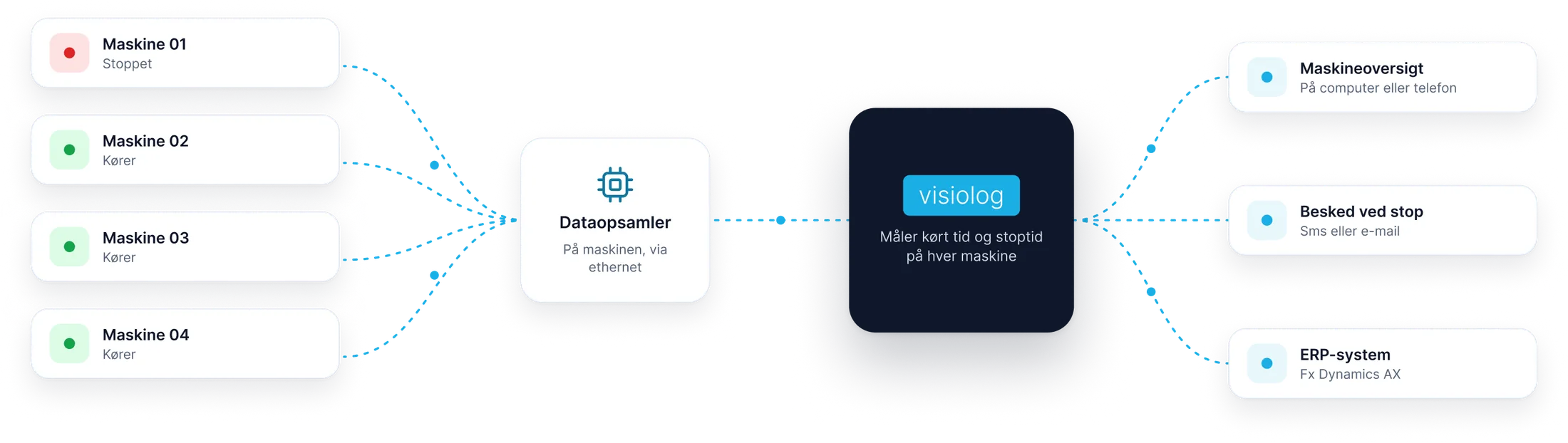
Visiolog measures running time and downtime at the machine itself, so every stop is included.
-
We connect a data collector to the machine
Envio's data collector fits all machine types, new and old, and connects via Ethernet.
-
See running time and downtime
For each machine, on your computer or phone.
-
Get notified when a machine stops
By SMS or email, so you can get it running again promptly.
See what Visiolog can show about your production
Book a demo and we will walk through the system using your machines as a starting point.
- A no-obligation walkthrough
- We usually respond within one working day
- Danish support from Silkeborg, 31 13 16 60
Prefer to try it yourself? Try the demo factory
Book a demo
Leave your details and we will call or email you.
Thank you, we have received your message
We usually contact you within one working day. If it is urgent, call 31 13 16 60.